Contents
Winsorization and Trimming: When Acceptable and How to Disclose
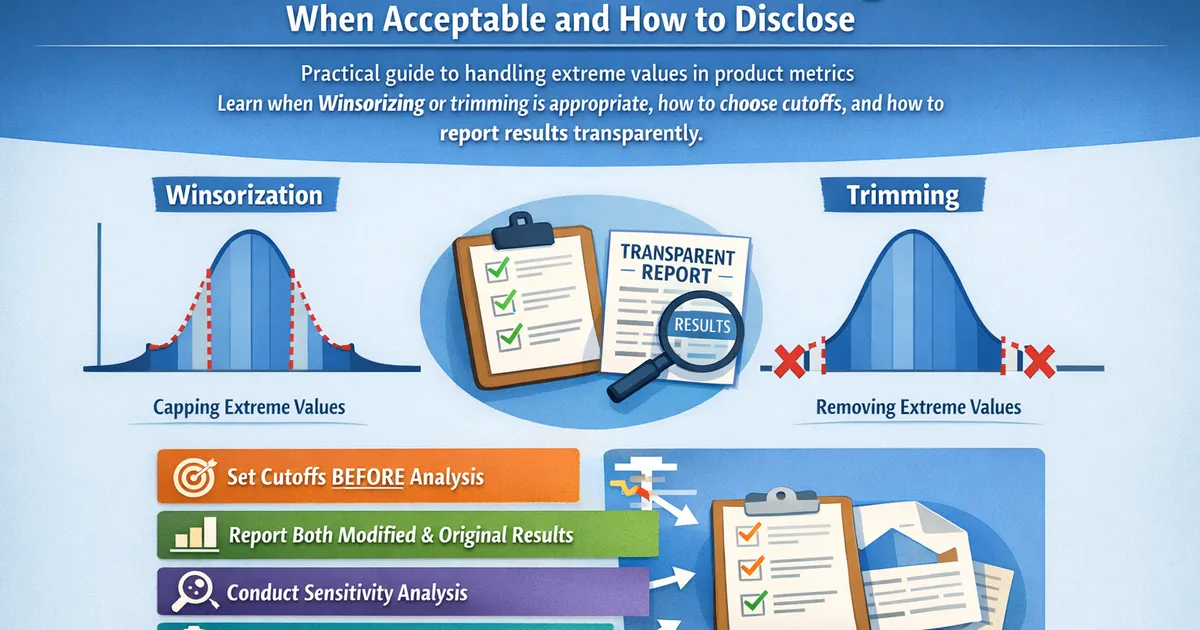
Practical guide to handling extreme values in product metrics. Learn when Winsorizing or trimming is appropriate, how to choose cutoffs, and how to report results transparently.
Quick Hits
- •Winsorization caps extreme values; trimming removes them entirely
- •Both reduce variance and whale influence, but change what you're measuring
- •Choose cutoffs BEFORE seeing treatment effects to avoid p-hacking
- •Always report both modified and unmodified results for transparency
- •Document your approach in a pre-analysis plan when possible
TL;DR
Winsorization caps extreme values at percentiles; trimming removes them entirely. Both are legitimate approaches for heavy-tailed data like revenue, reducing variance and increasing power. The key ethical requirements: choose your cutoff before seeing treatment effects, disclose your method, and run sensitivity analysis. Report both modified and unmodified results. This guide covers when to use each approach, how to choose cutoffs, and how to report responsibly.
Winsorization vs. Trimming
Winsorization
Replace extreme values with cutoff values.
Original: [1, 2, 3, 5, 8, 100]
Winsorized at 90th percentile (8): [1, 2, 3, 5, 8, 8]
- Keeps all observations (same n)
- Caps extreme values, doesn't remove them
- Mean is pulled toward center
Trimming
Remove extreme observations entirely.
Original: [1, 2, 3, 5, 8, 100]
10% trimmed (remove top & bottom 10%): [2, 3, 5, 8]
- Reduces sample size
- Removes rather than modifies
- Trimmed mean excludes extremes from calculation
Comparison
| Aspect | Winsorization | Trimming |
|---|---|---|
| Sample size | Preserved | Reduced |
| Extreme values | Capped | Removed |
| Interpretation | "Capped metric" | "Typical behavior" |
| Variance reduction | Good | Better |
| Information loss | Some | More |
Implementation
import numpy as np
from scipy import stats


def winsorize(data, lower_percentile=0, upper_percentile=99):
    """
    Winsorize data at specified percentiles.

    Parameters:
    -----------
    data : array-like
        Data to winsorize
    lower_percentile : float
        Lower cutoff percentile (0-100)
    upper_percentile : float
        Upper cutoff percentile (0-100)

    Returns:
    --------
    dict with winsorized data and cutoff info
    """
    data = np.asarray(data)

    lower_bound = np.percentile(data, lower_percentile)
    upper_bound = np.percentile(data, upper_percentile)

    winsorized = np.clip(data, lower_bound, upper_bound)

    n_lower_capped = np.sum(data < lower_bound)
    n_upper_capped = np.sum(data > upper_bound)

    return {
        'data': winsorized,
        'lower_bound': lower_bound,
        'upper_bound': upper_bound,
        'n_lower_capped': n_lower_capped,
        'n_upper_capped': n_upper_capped,
        'pct_modified': (n_lower_capped + n_upper_capped) / len(data) * 100
    }


def trimmed_mean(data, trim_proportion=0.05):
    """
    Calculate trimmed mean.

    Parameters:
    -----------
    data : array-like
        Data to trim
    trim_proportion : float
        Proportion to trim from each tail (0-0.5)

    Returns:
    --------
    dict with trimmed mean and info
    """
    data = np.asarray(data)
    n = len(data)

    n_trim = int(n * trim_proportion)
    sorted_data = np.sort(data)

    if n_trim > 0:
        trimmed_data = sorted_data[n_trim:-n_trim]
    else:
        trimmed_data = sorted_data

    return {
        'trimmed_mean': np.mean(trimmed_data),
        'regular_mean': np.mean(data),
        'n_original': n,
        'n_trimmed': len(trimmed_data),
        'n_removed': 2 * n_trim,
        'lower_cutoff': sorted_data[n_trim] if n_trim > 0 else sorted_data[0],
        'upper_cutoff': sorted_data[-n_trim-1] if n_trim > 0 else sorted_data[-1]
    }


# Example: Revenue data with whale
np.random.seed(42)
n = 1000

# Log-normal revenue with a few whales
revenue = np.random.lognormal(3, 1, n)
# Add some whales
revenue[np.random.choice(n, 5, replace=False)] = np.random.uniform(5000, 20000, 5)

print("Revenue Analysis: Handling Extremes")
print("=" * 60)

# Original statistics
print(f"\nOriginal Data:")
print(f"  N: {n}")
print(f"  Mean: ${np.mean(revenue):.2f}")
print(f"  Median: ${np.median(revenue):.2f}")
print(f"  Std Dev: ${np.std(revenue):.2f}")
print(f"  Max: ${np.max(revenue):.2f}")

# Winsorized
win_result = winsorize(revenue, lower_percentile=0, upper_percentile=99)
print(f"\nWinsorized (99th percentile cap at ${win_result['upper_bound']:.2f}):")
print(f"  N: {n} (unchanged)")
print(f"  Values capped: {win_result['n_upper_capped']} ({win_result['pct_modified']:.1f}%)")
print(f"  Mean: ${np.mean(win_result['data']):.2f}")
print(f"  Std Dev: ${np.std(win_result['data']):.2f}")

# Trimmed
trim_result = trimmed_mean(revenue, trim_proportion=0.01)
print(f"\n1% Trimmed (removed {trim_result['n_removed']} observations):")
print(f"  N: {trim_result['n_trimmed']}")
print(f"  Upper cutoff: ${trim_result['upper_cutoff']:.2f}")
print(f"  Trimmed Mean: ${trim_result['trimmed_mean']:.2f}")
print(f"  Regular Mean: ${trim_result['regular_mean']:.2f}")
When to Use Each Approach
Use Winsorization When:
- You want to keep all observations for other analyses
- The metric has a natural cap (e.g., satisfaction 1-5)
- Extreme values are real but shouldn't dominate
- You need to report "capped" metric to stakeholders
Use Trimming When:
- You want to understand typical behavior
- Extreme values may be measurement errors
- You're computing a robust estimate of location
- Statistical tests assume no extreme outliers
Use Neither When:
- Extreme values are the point (whale analysis)
- You care about total effect (total revenue impact)
- Data is already well-behaved
- You haven't validated the approach pre-analysis
Choosing Cutoffs
Pre-Specified Approaches
| Approach | Method | When to Use |
|---|---|---|
| Fixed percentile | 99th, 95th, etc. | General purpose |
| Domain-based | Max plausible value | Known constraints |
| IQR rule | Symmetric data | |
| Standard deviation | Near-normal data |
The Critical Rule
Choose cutoffs BEFORE seeing treatment effects.
Bad: "Let's try 95th... no effect. Try 99th... still no effect. Try 99.9th... found it!" Good: "Pre-registered: Winsorize at 99th percentile. Here are the results."
Sensitivity Analysis
def sensitivity_analysis(control, treatment, percentiles=[95, 97, 99, 99.5, 100]):
    """
    Run analysis at multiple Winsorization levels.
    """
    results = []

    for pct in percentiles:
        # Winsorize both groups using pooled cutoff
        pooled = np.concatenate([control, treatment])
        upper_bound = np.percentile(pooled, pct)

        win_control = np.clip(control, None, upper_bound)
        win_treatment = np.clip(treatment, None, upper_bound)

        # Effect
        mean_diff = np.mean(win_treatment) - np.mean(win_control)
        lift = mean_diff / np.mean(win_control) * 100

        # T-test
        t_stat, p_value = stats.ttest_ind(win_control, win_treatment)

        results.append({
            'percentile': pct,
            'cutoff': upper_bound,
            'control_mean': np.mean(win_control),
            'treatment_mean': np.mean(win_treatment),
            'lift_pct': lift,
            'p_value': p_value
        })

    return results


# Example
np.random.seed(42)
control = np.random.lognormal(3, 1, 2000)
treatment = np.random.lognormal(3.05, 1, 2000)  # 5% higher mean

# Add whales to treatment (might inflate effect)
treatment[np.random.choice(len(treatment), 3, replace=False)] = [5000, 8000, 12000]

print("Sensitivity Analysis: Effect at Different Winsorization Levels")
print("=" * 70)
print(f"{'Percentile':<12} {'Cutoff':>10} {'Control':>12} {'Treatment':>12} {'Lift':>10} {'p-value':>10}")
print("-" * 70)

for r in sensitivity_analysis(control, treatment):
    print(f"{r['percentile']:<12} ${r['cutoff']:>9.0f} ${r['control_mean']:>11.2f} ${r['treatment_mean']:>11.2f} {r['lift_pct']:>9.1f}% {r['p_value']:>10.4f}")
Proper Disclosure
What to Report
- Method used: Winsorization or trimming
- Cutoff chosen: Percentile or absolute value
- When decided: Before or after seeing data
- Observations affected: Count and percentage
- Sensitivity check: Results at alternative cutoffs
- Both results: Modified and unmodified
Example Report Template
## Methodology Note: Outlier Handling

Revenue was Winsorized at the 99th percentile ($X,XXX) to reduce
the influence of extreme purchases on the mean. This threshold was
specified in our pre-analysis plan based on historical data showing
the 99th percentile captures legitimate high-value customers while
excluding anomalous transactions.

**Impact**: X observations (Y.Y%) were capped in control,
Z observations (W.W%) in treatment.

**Results**:
- Winsorized (primary): +5.2% lift (95% CI: 2.1% to 8.3%, p=0.002)
- Unwinsorized (sensitivity): +4.8% lift (95% CI: -3.2% to 12.8%, p=0.24)

The Winsorized result shows a significant effect that is masked in the
unwinsorized analysis due to a single large purchase ($XX,XXX) in the
control group.
Red Flags to Avoid
❌ "We removed outliers" (no details) ❌ "After cleaning the data..." (implies outliers are errors) ❌ Only reporting the version that shows significance ❌ Choosing cutoff after seeing which gives best p-value ❌ Not mentioning outlier handling at all
Statistical Properties
Effect on Standard Error
Winsorization reduces variance → smaller SE → higher power
def compare_se(data, percentile=99, n_bootstrap=1000):
    """
    Compare standard errors before and after Winsorization.
    """
    # Original SE (bootstrap)
    original_means = [np.mean(np.random.choice(data, len(data), replace=True))
                      for _ in range(n_bootstrap)]
    se_original = np.std(original_means)

    # Winsorized SE
    cutoff = np.percentile(data, percentile)
    win_data = np.clip(data, None, cutoff)
    win_means = [np.mean(np.random.choice(win_data, len(win_data), replace=True))
                 for _ in range(n_bootstrap)]
    se_win = np.std(win_means)

    return {
        'se_original': se_original,
        'se_winsorized': se_win,
        'reduction': (se_original - se_win) / se_original * 100
    }


# Example
np.random.seed(42)
revenue = np.random.lognormal(3, 1.5, 1000)
revenue[np.random.choice(1000, 10)] *= 50  # Add extremes

se_comparison = compare_se(revenue, percentile=99)
print(f"SE Original: ${se_comparison['se_original']:.2f}")
print(f"SE Winsorized: ${se_comparison['se_winsorized']:.2f}")
print(f"Reduction: {se_comparison['reduction']:.1f}%")
Effect on Coverage
Properly done, Winsorization maintains valid coverage. But:
- Using data-driven cutoffs (IQR rule) can inflate Type I error
- Pre-specifying cutoffs maintains validity
- Bootstrap CIs work well with Winsorized data
Code: Complete Analysis Pipeline
import numpy as np
import pandas as pd
from scipy import stats


class RobustComparison:
    """
    Complete pipeline for comparing groups with outlier handling.
    """

    def __init__(self, control, treatment, winsorize_pct=99, trim_pct=0.01):
        self.control_raw = np.asarray(control)
        self.treatment_raw = np.asarray(treatment)
        self.winsorize_pct = winsorize_pct
        self.trim_pct = trim_pct

        # Compute pooled cutoff
        pooled = np.concatenate([self.control_raw, self.treatment_raw])
        self.upper_cutoff = np.percentile(pooled, winsorize_pct)

    def raw_analysis(self):
        """Analysis without modification."""
        mean_c = np.mean(self.control_raw)
        mean_t = np.mean(self.treatment_raw)
        t_stat, p_value = stats.ttest_ind(self.control_raw, self.treatment_raw)

        return {
            'method': 'Raw',
            'control_mean': mean_c,
            'treatment_mean': mean_t,
            'difference': mean_t - mean_c,
            'lift_pct': (mean_t - mean_c) / mean_c * 100,
            'p_value': p_value,
            'n_modified': 0
        }

    def winsorized_analysis(self):
        """Analysis with Winsorization."""
        win_c = np.clip(self.control_raw, None, self.upper_cutoff)
        win_t = np.clip(self.treatment_raw, None, self.upper_cutoff)

        mean_c = np.mean(win_c)
        mean_t = np.mean(win_t)
        t_stat, p_value = stats.ttest_ind(win_c, win_t)

        n_modified = (np.sum(self.control_raw > self.upper_cutoff) +
                      np.sum(self.treatment_raw > self.upper_cutoff))

        return {
            'method': f'Winsorized ({self.winsorize_pct}%)',
            'control_mean': mean_c,
            'treatment_mean': mean_t,
            'difference': mean_t - mean_c,
            'lift_pct': (mean_t - mean_c) / mean_c * 100,
            'p_value': p_value,
            'n_modified': n_modified,
            'cutoff': self.upper_cutoff
        }

    def trimmed_analysis(self):
        """Analysis with trimmed mean."""
        trim_mean_c = stats.trim_mean(self.control_raw, self.trim_pct)
        trim_mean_t = stats.trim_mean(self.treatment_raw, self.trim_pct)

        # Bootstrap for inference on trimmed means
        n_boot = 2000
        boot_diffs = []
        for _ in range(n_boot):
            boot_c = np.random.choice(self.control_raw, len(self.control_raw), replace=True)
            boot_t = np.random.choice(self.treatment_raw, len(self.treatment_raw), replace=True)
            boot_diffs.append(stats.trim_mean(boot_t, self.trim_pct) -
                              stats.trim_mean(boot_c, self.trim_pct))

        ci = np.percentile(boot_diffs, [2.5, 97.5])
        p_value = 2 * min(np.mean(np.array(boot_diffs) < 0),
                          np.mean(np.array(boot_diffs) > 0))

        n_trim_total = int(len(self.control_raw) * self.trim_pct * 2) + \
                       int(len(self.treatment_raw) * self.trim_pct * 2)

        return {
            'method': f'Trimmed ({self.trim_pct*100:.0f}%)',
            'control_mean': trim_mean_c,
            'treatment_mean': trim_mean_t,
            'difference': trim_mean_t - trim_mean_c,
            'lift_pct': (trim_mean_t - trim_mean_c) / trim_mean_c * 100,
            'p_value': p_value,
            'ci': ci,
            'n_removed': n_trim_total
        }

    def full_report(self):
        """Generate full comparison report."""
        raw = self.raw_analysis()
        win = self.winsorized_analysis()
        trim = self.trimmed_analysis()

        print("Robust Comparison Report")
        print("=" * 70)
        print(f"\nSample sizes: Control={len(self.control_raw)}, Treatment={len(self.treatment_raw)}")
        print(f"Winsorization cutoff: ${self.upper_cutoff:.2f}")

        print(f"\n{'Method':<25} {'Control':>12} {'Treatment':>12} {'Lift':>10} {'p-value':>10}")
        print("-" * 70)

        for r in [raw, win, trim]:
            print(f"{r['method']:<25} ${r['control_mean']:>11.2f} ${r['treatment_mean']:>11.2f} {r['lift_pct']:>9.1f}% {r['p_value']:>10.4f}")

        print("\n" + "-" * 70)
        print("Observations modified/removed:")
        print(f"  Winsorized: {win['n_modified']} capped at ${win['cutoff']:.2f}")
        print(f"  Trimmed: {trim['n_removed']} removed")

        return {'raw': raw, 'winsorized': win, 'trimmed': trim}


# Example usage
np.random.seed(42)

control = np.random.lognormal(3, 1.2, 3000)
treatment = np.random.lognormal(3.08, 1.2, 3000)

# Add asymmetric whales
control[np.random.choice(len(control), 5)] = np.random.uniform(3000, 8000, 5)
treatment[np.random.choice(len(treatment), 2)] = np.random.uniform(3000, 8000, 2)

comparison = RobustComparison(control, treatment, winsorize_pct=99, trim_pct=0.01)
results = comparison.full_report()
Related Methods
- Metric Distributions (Pillar) - Full distributions overview
- Why Revenue Is Hard - Heavy tails and variance
- Handling Outliers - Broader outlier handling
- Bootstrap for Heavy-Tailed Metrics - Inference methods
Key Takeaway
Winsorization and trimming are legitimate tools for analyzing heavy-tailed metrics. They reduce variance, increase power, and give more stable estimates. But they change your estimand—from "total revenue" to "capped revenue" or "typical revenue." The ethical requirements are straightforward: choose your approach before seeing results, be transparent about what you did, run sensitivity analysis, and report both modified and raw results. When done properly, these methods help you find real effects that would otherwise be drowned in whale-driven noise.
References
- https://doi.org/10.1198/016214508000000337
- https://www.jstor.org/stable/2290945
- https://doi.org/10.1037/1082-989X.3.4.409
- Wilcox, R. R. (2017). *Introduction to Robust Estimation and Hypothesis Testing* (4th ed.). Academic Press.
- Tukey, J. W. (1960). A survey of sampling from contaminated distributions. *Contributions to Probability and Statistics*, 448-485.
- Keselman, H. J., Wilcox, R. R., Othman, A. R., & Fradette, K. (2002). Trimming, transforming statistics, and bootstrapping. *Journal of Modern Applied Statistical Methods*, 1(2), 288-301.
Frequently Asked Questions
What's the difference between Winsorizing and trimming?
How do I choose the cutoff percentage?
Is it ethical to Winsorize/trim data?
Key Takeaway
Winsorizing and trimming are valid tools for handling extreme values in heavy-tailed metrics like revenue. They reduce variance, increase power, and give more stable estimates. But they change what you're measuring—from total revenue to 'revenue excluding extreme purchases.' Always choose cutoffs before seeing results, report both modified and raw analyses, and be transparent about how the modification affects interpretation.